Instructions
Automatic work instructions
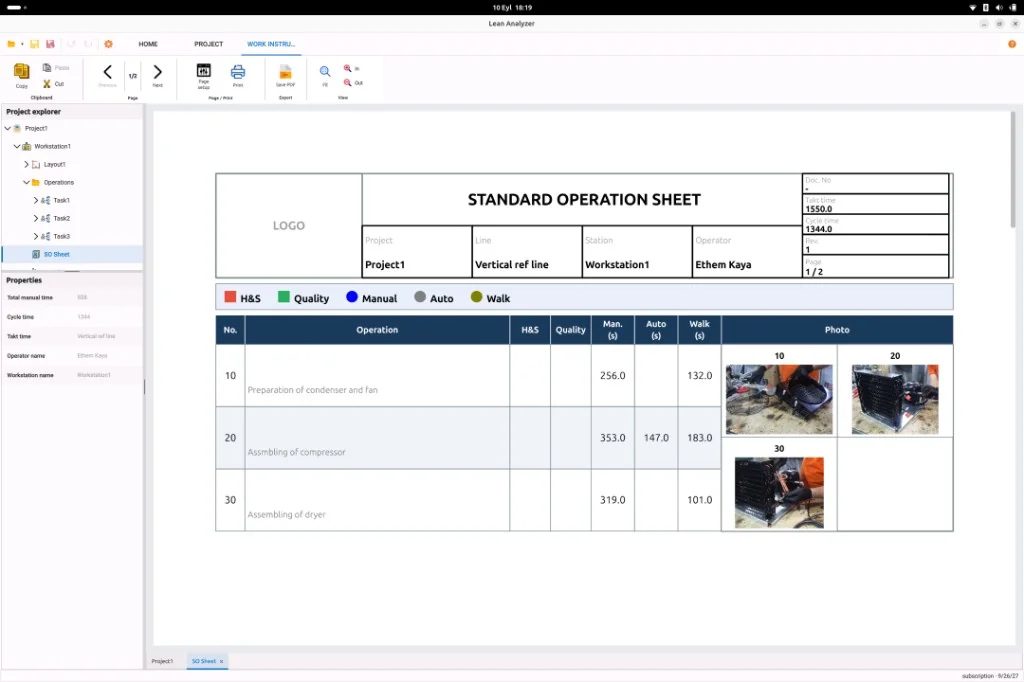
The standard should match the work you just timed. Lean Analyzer drafts the instruction from the study, then you edit it for the people who will use it.
Why paper instructions go stale
The real method often lives in one operator’s head. The binder says something else. Writing a new sheet by hand means hours of screenshots, formatting, and copying times from a separate file.
- The SOP and the timed method are two documents that drift
- Engineers rebuild the sequence instead of starting from the study
- Pictures are missing, cropped poorly, or from an older fixture
- New hires follow the page; the crew follows memory
How it works
From the floor to a usable study
-
1
Finish the study
Mark the operation in the time study so the sequence and times exist in Lean Analyzer.
-
2
Generate the draft
Create a first-pass work instruction from that operation: steps, times, and images pulled from the study — not typed from scratch.
-
3
Edit for the floor
Rewrite wording in the language operators use. Crop or annotate pictures. Drop steps that do not belong on the sheet.
-
4
Issue the standard
Print or share a sheet that still traces back to the measured work, so a later restudy can update it instead of starting over.
What you get
Outputs you can take to the team

Numbered steps from the study
The sequence is the one you timed, not a rewrite from memory.

Times on the sheet
Element times travel with the instruction instead of sitting in a side spreadsheet.

Pictures you can still edit
Use the image editor to crop, mark, and label before the sheet goes to the line.

A starting point, not a black box
The draft is yours to change. Industrial engineers remain in control of the standard.
Compared with the old way
Authoring by hand
- Scrub video, screenshot, paste, retype times
- The instruction and the study live in different files
- Easy to skip a step or use an old photo
- Each process change means rebuilding the document
Draft from the study
- Generate the first pass from the timed operation
- Sequence, times, and images start in one place
- Edit text and pictures before you issue the sheet
- Restudy, then refresh instead of starting from a blank page
What a work instruction is for
A work instruction is the step-by-step job sheet operators use at the station: what to do, in what order, with which picture and key point. Digital or printed, it only works if it matches the current method.
Tied to the study on purpose
You are not copying times into Word. When the fixture or the method changes, restudy the job and refresh the instruction from the same operation.
FAQ
Questions, answered
Study the work on the workstation
First month free. Desktop app. Cancel anytime.