Time study
Time study with video
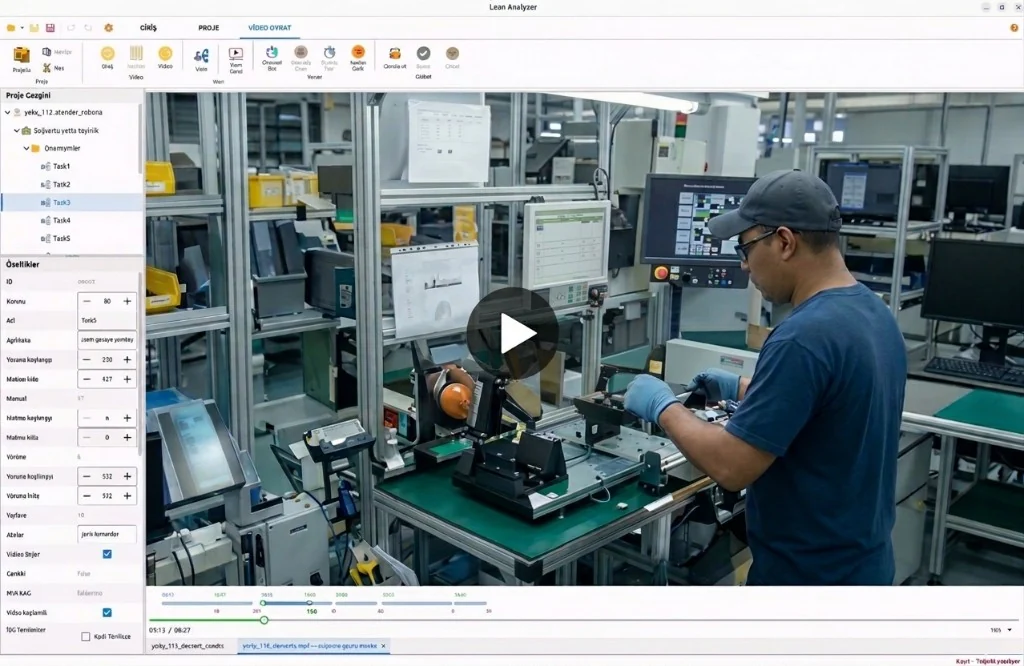
A time study should leave a record you can replay. Lean Analyzer times each element on the video, so the number and the motion stay together.
Why a stopwatch study falls short
A stopwatch study times one element at a time, then the charts live in a spreadsheet. When someone asks “what did we actually time?”, there is often nothing to replay.
- The observer cannot easily re-check a figure after the walk is over
- Manual, machine, and walk times get mixed or rounded in the notebook
- Operators work differently when watched, and micro-stops are easy to miss
- The write-up is hard to defend in a kaizen review without the footage
How it works
From the floor to a usable study
-
1
Capture the work
Record the operation on the shop floor — phone, tablet, or a fixed camera. Bring the file to the workstation. Nothing is uploaded to this website to run the study.
-
2
Mark elements on the timeline
Open the video in Lean Analyzer and select ranges by dragging. Each mark is an observation tied to that stretch of the recording.
-
3
Split manual, machine, and walk
Fine-tune operator time, process-controlled (auto) time, and walking between stations. Adjust after the first pass without losing the clip.
-
4
Review with the team
Replay the same cycle in a meeting. Show which motion produced a time, then carry the sequence into a work instruction or layout.
What you get
Outputs you can take to the team

Timeline element times
Every observation stays linked to the video frame range it came from.
Manual, machine, walk
Separate people from equipment and from walking, the same split used on a standard work chart.

A record you can replay
The study is not only a table of numbers. You can go back to the motion when the method is questioned.

Input for the rest of the app
The same operation feeds automatic work-instruction drafts and layout task numbers.
Compared with the old way
Stopwatch and spreadsheet
- Time one element at a time, then rebuild the charts by hand
- Hard to re-check a number after you leave the line
- Walk, wait, and machine time often get lumped together
- The write-up and the real method drift apart
Video study in Lean Analyzer
- Mark the cycle on a timeline synced to the footage
- Replay any element with the team in the same file
- Split manual, machine (auto), and walk on each task
- Carry the sequence into instructions and layouts
What a time study is for
A time study measures how long each element of a task takes and how the work is done. Industrial engineers use it to set a standard, see waste, and balance work against takt. Lean Analyzer keeps that measurement on the recording instead of only in a notebook.
Where it runs
Analysis stays on the workstation. That fits gemba walks and plants where a cloud tool is not practical. The public site is for product information, licenses, and downloads — not for hosting shop-floor video.
FAQ
Questions, answered
Study the work on the workstation
First month free. Desktop app. Cancel anytime.